On this page
monday.com review
Ready to organize your work with Monday.com?
Plan projects, automate routine tasks, collaborate with your team, and track progress from one flexible work management platform.
Explore Monday.com →
monday.com Review 2026: Features, Benefits, Pros & Cons
Managing projects becomes difficult when tasks are spread across emails, WhatsApp messages, spreadsheets, meetings, and different applications. In this monday.com review, we’ll look at the platform’s most useful features, benefits, AI and automation capabilities, pros and cons, and how it can help businesses organize their work.
Managing projects becomes difficult when tasks are spread across emails, WhatsApp messages, spreadsheets, meetings, and different applications.
Who is responsible for each task?
What has been completed?
Which tasks are delayed?
What should the team work on next?
As a business grows, answering these simple questions can become surprisingly difficult.
monday.com is designed to solve this problem by bringing tasks, projects, team responsibilities, workflows, and progress tracking into one visual workspace.
In this monday.com review, we’ll look at its most useful features, benefits, limitations, and the types of businesses that may benefit from using it.
Quick Answer: What Is monday.com?
monday.com is a visual work management and AI-powered business platform that helps teams organize projects, assign tasks, track deadlines, automate repetitive work, and monitor progress.
Instead of managing work across multiple spreadsheets and conversations, businesses can create structured workflows where everyone can see:
- What needs to be done
- Who is responsible
- Current task status
- Task priority
- Deadlines
- Project timelines
- Files and documents
- Comments and updates
- Overall project progress
It can be used by small businesses, marketing teams, sales teams, project managers, HR departments, operations teams, agencies, and larger organizations.
monday.com at a Glance
Best for: Teams that need visual task and project management
Free Plan: Available
Paid Plans: Available with additional features and higher limits
Ease of Use: Beginner-friendly once the workspace is configured
Main Uses: Projects, tasks, workflows, team collaboration, CRM, marketing, operations and automation
AI Features: Available
Mobile Apps: Available
Suitable for Small Businesses: Yes
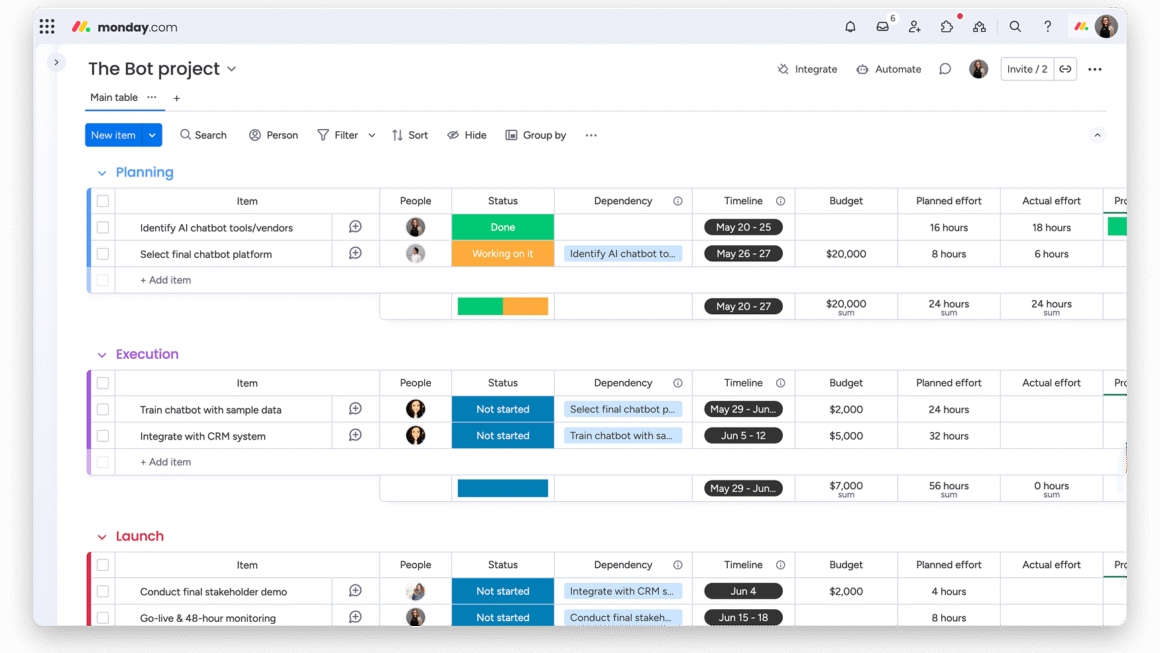
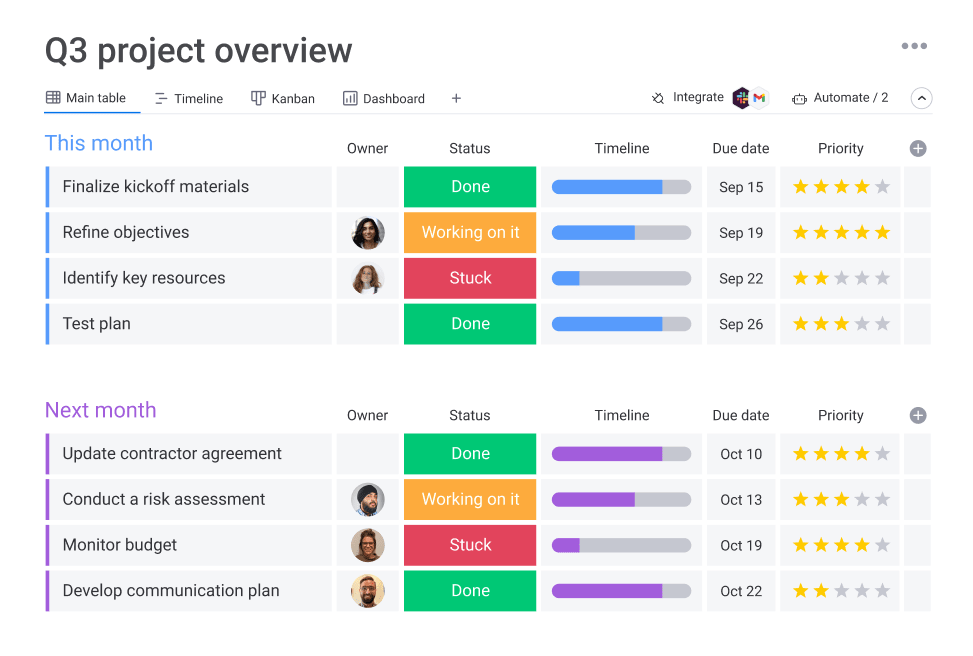
1. Visual Boards Make Work Easier to Understand
One of the main features of monday.com is its visual board system.
A board can represent a project, department, marketing campaign, customer pipeline, recruitment process, or almost any other workflow.
For example, a marketing team could create:
| Task | Owner | Priority | Status | Deadline |
|---|---|---|---|---|
| Homepage Redesign | Sarah | High | Working on it | Sept 28 |
| Google Ads Campaign | Ahmed | High | Review | Sept 25 |
| October Newsletter | John | Medium | Not Started | Oct 2 |
| Product Video | Maria | Medium | Done | Sept 20 |
At a glance, managers and employees can understand what is happening.
This helps answer an important question:
Who is doing what, and what is the current status?
That can be much easier than searching through emails, spreadsheets, or WhatsApp conversations.
2. Assign Tasks and Responsibilities Clearly
One of the most common workplace problems is unclear responsibility.
A manager may request something during a meeting, but later nobody is certain who was supposed to complete it.
With monday.com, tasks can be assigned to specific people or teams.
A basic workflow could look like:
Task → Assigned Employee → Deadline → Status → Completion
Everyone can see who owns the task.
This can help reduce situations where managers repeatedly need to ask:
“Who is handling this?”
For growing teams, clear task ownership can make a significant difference.
3. Track Projects Visually
Different employees need different ways of looking at work.
A team member may want a straightforward list of assigned tasks.
A project manager may prefer a timeline.
Senior management may want a dashboard showing the overall status.
monday.com provides different ways to organize and visualize work depending on the plan and configuration.
These can be useful for:
- Website development
- Marketing campaigns
- Product launches
- Recruitment
- Event planning
- Client projects
- Content calendars
- Sales activities
- Internal operations
- Business projects
Instead of forcing every department into exactly the same workflow, businesses can customize monday.com around different types of work.
4. Dashboards Give Managers a Bigger Picture
Individual task boards are useful for everyday work.
But managers often need to answer a bigger question:
How is the entire project or department performing?
This is where dashboards become useful.
Dashboards can bring information from different boards together and present important information in a more visual format.
Depending on your setup, dashboards can help monitor:
- Project progress
- Task completion
- Workload
- Timelines
- Budgets
- Performance indicators
- Multiple projects
- Team activities
Instead of opening several different boards, managers can create a higher-level view of important business information.
5. Automations Can Reduce Repetitive Work
Automation is one of the more powerful areas of monday.com.
Businesses often perform the same small administrative actions repeatedly.
For example:
When a task is completed → notify the manager.
When a deadline arrives → remind the employee.
When a new request is received → create a task.
When a task reaches a particular stage → assign it to another team member.
These processes can potentially be automated.
The benefit isn’t simply saving a few mouse clicks.
Good automation can reduce repetitive administrative work and help employees focus on more important activities.
6. Connect monday.com With Other Business Tools
Most businesses already use several different software applications.
You may already have tools for:
- Communication
- Calendars
- Cloud storage
- Customer management
- Marketing
- Meetings
monday.com provides integrations that can help connect external business tools with your workflows.
For example, integrations are available for popular services such as Gmail, Outlook, and Slack, among many others.
The idea is simple:
Connect your tools → reduce duplicate work → keep important information organized.
The exact integrations and usage limits available can depend on your monday.com plan.
7. Templates Help You Start Faster
Starting from an empty workspace can sometimes be confusing.
You may wonder:
Which columns should I create?
What statuses should I use?
How should I organize the project?
What information should employees enter?
monday.com provides ready-made templates for many common workflows.
Templates can help businesses quickly create starting points for projects, marketing, operations, sales, HR, and other activities.
However, a template should be treated as a starting point, not a strict rule.
Your business should customize the workflow around the way your team actually works.
8. Keep Team Communication Connected to Tasks
Another common business problem happens when the task is stored in one place but the conversation about that task happens somewhere else.
For example:
The task may be inside a spreadsheet.
The discussion happens through WhatsApp.
The files arrive through email.
The approval happens during a meeting.
Later, nobody remembers where the final decision was made.
monday.com allows conversations and updates to remain connected with the relevant work.
This makes it easier for team members to understand the history and current status of a task.
It can be particularly useful for remote teams and businesses with employees working from different locations.
9. Forms Can Turn Requests Into Organized Work
Many businesses receive requests through several different channels.
Examples include:
- Customer enquiries
- Marketing requests
- IT requests
- Employee requests
- Design requests
- Project requests
- Feedback
- Internal approvals
When requests arrive through different emails and messages, tracking them can become difficult.
monday.com WorkForms can collect information in a structured way and turn submissions into organized items inside a workflow.
A process could look like:
Form Submitted → Task Created → Employee Assigned → Status Updated → Request Completed
This can make requests much easier to track.
10. monday.com Is Becoming More AI-Focused
monday.com is no longer simply a colorful project management board.
The company is increasingly developing its platform around AI-assisted work and automation.
Its AI capabilities can help users perform tasks such as working with information, generating content, creating workflows, and building business processes more efficiently.
monday.com has introduced AI capabilities including tools such as:
- monday sidekick
- AI workflows
- AI blocks
- monday vibe
- monday magic
For example, AI can help businesses reduce some manual steps involved in creating and managing workflows.
This is an important development because monday.com is gradually expanding beyond conventional project management toward a broader AI-powered work platform.
What Business Problems Can monday.com Help Solve?
Instead of looking only at features, it is better to think about actual business problems.
Problem: Nobody knows who owns a task
Possible solution: Assign tasks to specific employees.
Problem: We keep missing deadlines
Possible solution: Use deadlines, timelines, reminders, and automations.
Problem: Managers constantly ask employees for updates
Possible solution: Use statuses, boards, and dashboards.
Problem: Our work is spread across spreadsheets
Possible solution: Move suitable workflows into structured boards.
Problem: We repeat the same administrative work
Possible solution: Create automations.
Problem: Customer or employee requests arrive everywhere
Possible solution: Use forms and centralized request boards.
Problem: Management cannot see overall progress
Possible solution: Create management dashboards.
This is the best way to evaluate monday.com:
Start with the business problem, then decide which feature can solve it.
monday.com Pros
Here are some of the major advantages businesses may find useful:
- Visual task management
- Easy-to-understand boards
- Clear task ownership
- Deadline tracking
- Multiple project views
- Management dashboards
- Workflow automation
- Business software integrations
- Ready-made templates
- Forms for collecting requests
- Team collaboration
- Mobile apps
- AI-powered features
- Flexible workflows
- Suitable for different departments
The platform can be particularly useful when a company has outgrown informal task management through messages and spreadsheets.
monday.com Limitations
No business platform is perfect for every company.
There are a few things you should consider before adopting monday.com.
1. Some Features Require Paid Plans
monday.com has a free version, but more advanced capabilities and higher usage limits are available through paid plans.
Before upgrading, identify which features your business actually requires.
2. Too Much Customization Can Become Complicated
Flexibility is one of monday.com’s strengths.
But it can also become a weakness if a business creates too many boards, statuses, columns, and automations.
Keep your workflow simple.
Add complexity only when it solves a real problem.
3. Software Cannot Fix a Bad Business Process
Moving an unclear business process into software does not automatically improve it.
If nobody understands who should approve something or who is responsible for a task, digitizing the same process may simply reproduce the confusion.
A better approach is:
Simplify the process → Build the workflow → Test it → Automate where useful
Is monday.com Free?
Yes.
monday.com offers a free plan, making it possible to explore the platform before deciding whether your business needs additional paid functionality.
The free version has limitations compared with paid plans, so businesses should compare plans carefully before upgrading.
This is especially important for:
- Growing teams
- Businesses requiring automation
- Companies using integrations
- Project managers requiring advanced views
- Businesses needing more reporting
- Organizations managing multiple projects
We cover this subject separately in our detailed guide:
monday.com Free vs Paid: Features, Differences & Which Plan Should You Choose?
Important: Software pricing, features, plan limits, and AI availability can change. Always check the latest information directly from monday.com before purchasing or upgrading.
Who Should Consider monday.com?
monday.com can be useful for many different types of users.
Small Businesses
Small companies that have outgrown spreadsheets and messaging apps can use monday.com to create more structured workflows.
Project Teams
Teams can organize responsibilities, deadlines, dependencies, and progress.
Marketing Teams
Marketing departments can manage:
- Campaigns
- Content calendars
- Social media
- Advertising
- Creative requests
- Approvals
- Deadlines
Sales Teams
Sales teams can organize leads, follow-ups, customer information, and pipeline activities.
monday.com also offers dedicated CRM capabilities for businesses that need a more sales-focused environment.
Operations Teams
Recurring business processes can be organized and automated.
Managers
Dashboards can provide management with a higher-level overview of projects and team activity.
Remote Teams
Shared boards can give distributed teams better visibility into responsibilities and progress.
Who May Not Need monday.com?
Not everyone needs a full work management platform.
A freelancer managing only a few personal tasks may be perfectly comfortable with a simple to-do application.
Similarly, a very small team that already has an efficient and simple workflow should not introduce additional software simply because it has more features.
Software should solve a real problem.
Before choosing monday.com, ask:
What problem are we trying to solve?
If your problems include:
- Missed deadlines
- Unclear responsibilities
- Scattered information
- Too many spreadsheets
- Repetitive administrative work
- Poor project visibility
- Difficulty coordinating teams
then monday.com may be worth exploring.
Frequently Asked Questions About monday.com
What is monday.com mainly used for?
monday.com is used to organize and manage tasks, projects, workflows, team responsibilities, business processes, and other collaborative work.
Is monday.com good for small businesses?
It can be.
Small businesses can use monday.com to organize projects, employees, marketing activities, customer workflows, and internal operations.
Whether it is appropriate depends on the complexity of the business and the features required.
Ready to organize your work with Monday.com?
Plan projects, automate routine tasks, collaborate with your team, and track progress from one flexible work management platform.
Explore Monday.com →Is monday.com only for project management?
No.
Project and task management are important uses, but monday.com can also support sales, marketing, operations, HR, service workflows, and other business processes.
Does monday.com have automation?
Yes.
Automations can help businesses reduce repetitive work by automatically triggering certain actions when predefined conditions occur.
Can monday.com connect with other software?
Yes.
monday.com supports integrations with a variety of popular business applications.
The availability and limits of individual integrations may depend on your subscription plan.
Does monday.com have AI?
Yes.
monday.com is increasingly incorporating AI capabilities across its platform to assist with workflows, information, automation, and business processes.
Is monday.com free?
monday.com currently provides a free plan with limitations.
Businesses that require additional capabilities can consider its paid plans.
Always check the current plan details before choosing a subscription because pricing and included features may change.
Final Thoughts: Is monday.com Worth Exploring?
The real advantage of monday.com isn’t simply its colorful task boards.
Its potential value comes from turning scattered work into a visible, structured, and manageable workflow.
A business can:
- Define what needs to be done
- Assign responsibility
- Set deadlines
- Track progress
- Collect requests
- Collaborate around tasks
- Automate repetitive actions
- Connect other business tools
- Monitor projects through dashboards
- Use AI to assist certain workflows
But you don’t need to use every feature.
Start with one problem.
Build one useful workflow.
Let your team become comfortable with it.
Then expand only where monday.com genuinely saves time or improves visibility.
The most important question isn’t:
“How many features does monday.com have?”
The better question is:
“Which of our business problems can monday.com solve?”
Once you know that answer, it becomes much easier to decide whether monday.com is right for your team.

Ready to organize your work with Monday.com?
Plan projects, automate routine tasks, collaborate with your team, and track progress from one flexible work management platform.
Explore Monday.com →